
This is the best and easiest CAC Business Name Registration tutorial that will show you how to register your business with the Corporate Affairs Commission (CAC).
CAC Business registration used to be a big deal before now. But thanks to technology, you can now register your business with the CAC without contacting any Lawyer, or professional or even visiting the CAC offices.
If you have an internet-enabled device, either your phone or computer, you will easily register your business using this guide from the comfort of your room!
After following this CAC Business Name Registration tutorial, you will be able to download your CAC certificate.
So if you are ready, let’s get started!
Take Note Before We Begin
Take Note Before We Begin
You can watch the video demonstration of this CAC Business registration below if you prefer it.
Types of CAC Business Registration
Basically, there are 5 types of CAC Business Registrations.
The one you will go for will depend on the type of business you are running. But I should also mention that most medium-scale businesses will most likely go with the Business Name Registration.
These are the types of Business registrations that you can go for on the CAC website
- Business Name
- Company or Limited (LTD)
- Incorporated Trustees (NGO)
- Limited Partnership
- Limited Liability Partnership
Business Name Registration Vs Company Registration (LTD)
When you want to register a business on the CAC portal, there are two possibilities;
- You (or your Client) already know the type of registration you want
- You may not know exactly which is which
The first scenario has solved itself automatically. But for the business owner who doesn’t know which is which, this is how to know which to go for:
A business name registration helps you have the consent of CAC that your business exists and that it’s a legit business.
Once your Business name has been approved by CAC, no other business can
use such a name again, it’s yours!

Company (LTD)
The same applies if you are registering a business as a Company(Limited, LTD).
However, registering an LTD takes your business status to the next level.
This is because the business now has better legal backing than that of a normal
Business name registration.
For instance, as an LTD, your business is separated from your assets with legal backing. This does not happen with a business name.
Company vs Business Name: Which Should You Go With?
Most small sole proprietorship businesses will register as a Business name.
That is more than enough to get them going. It’s also good for you because registering a Business name is the easiest of all types of business registration.
Meanwhile, do note that a Business name can always be upgraded to a company later
on.
Step By Step On How To Start CAC BusinessRegistration
Name Availability Search
The first step on how to start CAC Business registration is to carry out what is called Name Availability Search.
What this means is that you need to search through the CAC portal to be sure that the name you intend to register has not been registered by another business.
The way it works is that nobody cares how long you have been using your business name. If another business registers that name before you, then by the law, that person is the legal owner of the Name. It will not matter if you started using the name before this person.
So, once a name exists on the CAC database, no other person can register the business again.
So to carry out your name availability search;
- Open your browser and type in www.pre.cac.gov.ng
And then the next thing we’re going to do is that once this homepage loads, come
up to this “search now” tab and click it and wait for it to load.
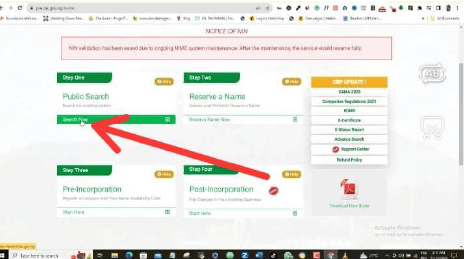
So I’ll come up here and type in my business name that I want to register, hoping that no one else has registered this name before me.
So let’s say that my new business name is CDMarketing.
I will go ahead and type this name in here and click “search”

This page will open in another tab and then we’ll wait for it to search for me. As you can see here, this page is telling me “search not found”
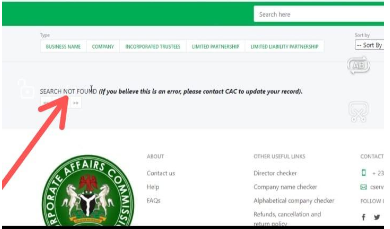
If this is the same result you got, then congratulations because “search not found” simply means that no name like this is existing on the CAC platform or the CAC database.
This means that no one else is using this name.
So it is available for registration.
What If Name Is Found?
But if a name is found in your own case, then you will have to brainstorm again and then choose another name.
Just try to find one that you think is unique and that the tendency for another person to have used this name is almost impossible.
So you keep doing that until you find a unique name that no one has ever used before, just like my example here.
So once you’re successful with this, then we move to the next step of our CAC registration of the business name, which is to reserve the name.
LOOK HERE!: Click Here To Learn How To Start Using WhatsApp Business Like A Pro!
Name Reservation
The next step is for me to reserve this name that I just did a search for, which is “CD marketing”
I will return to the home page and then come back and click reserve name now.
Now I want to assume that you are doing this for the very first time so you don’t already have an existing account with CAC.
That means that you will have to create a new account.
If you already have an existing account then all you have to do here is just to sign in.
So I will go ahead and create a new account in this case.
Note: if you are offering this as a service, make sure that you create a brand-new account for each of your clients. Don’t use your own existing account. If you do, it’s your name that will show up in the account details and you don’t want to do that right?
I’ll come down here to “new to us?” and then click “sign up” to start.

Just look through this form and make sure that you fill in your details which must all be correct.
Again, if you’re doing this as a business, you can screenshot this entire page and give it to your client to fill maybe on a sheet of paper or online so you can make your job much easier when you are doing this registration for them.

So once you are sure about your details here, go ahead and click Register.
Then a confirmation email will be sent to the email address you used in this form.
Go to your email inbox and look for the email from CAC.
Open it up, click the link and it will redirect you back to the CAC website where you will continue your registration.
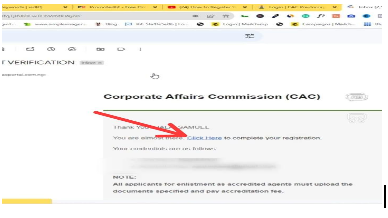
You can see here “email confirmed”

So I will just log into my account and click login.
I can either login with my username, my email, my phone number or my accredited number.
I will just choose email here.
Click “I’m not a robot.”
Input your password. You can now log in.
Input your password. You can now log in.
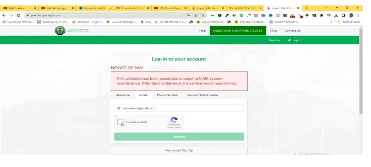
Okay, now I am logged in and you can see what my dashboard looks like.
Reserving Name Properly
The next thing to do here is to reserve a business name properly. So I’ll just click the “New Name Reservation” button which will take us to another page.

Now under company type, you will see a couple of fields that you have to fill.
Come to the classification field and click the drop-down arrow and select your option.
Select a business name.
I’ll do the same under specific types.
I’ll choose sole proprietor, which is the right option for most small or solo businesses.
But feel free to choose partnership if that is your best option
now under the proposed name, I already did my name search and I know that I can use “CD marketing”
So I’ll just impute it in here as my option one. But here CAC is giving us another opportunity to add a backup option which is option two just in case option one is not available.
But if you did your research in the first step, then you might not need to bother yourself with option two which is not compulsory anyways.
And once I am done I will click save and continue.

What is your reason for the availability search?
Of course, I will select new incorporation registration under nature of business category.
Look through the list and pick the one that best describes your business.
I run a marketing agency for example and I could not find my best option so I will just go with other service activities.
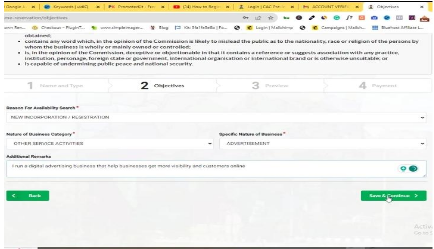
But I advise that as much as possible, you should look out and choose your best option again under the “specific nature of business”
So here is the detail of what we have included so far. I will save and continue
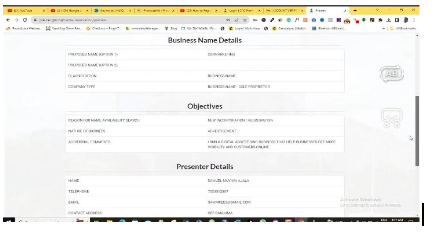
Here I have to reserve this name with a token of ₦500.00 to do so, click the “Remita” button.
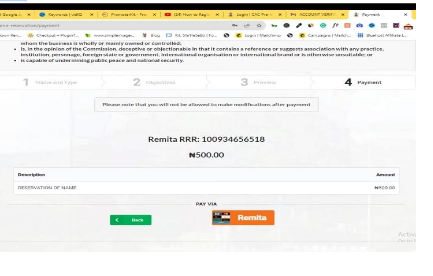
At the end of the day we are going to be paying about ₦663.94 thereabouts.
So if you are ready to pay, click the “Submit” button here.
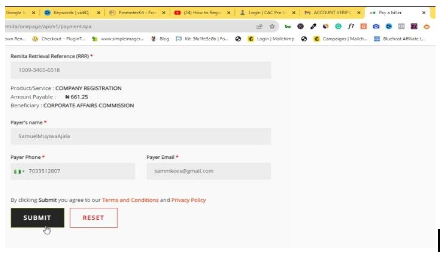
So here is the total price you will pay for the reservation of your business name.
This makes sure that no one else is able to use this name except you, even if you are not ready to register the name right away.
So I will just fill in my card details and pay just like I’m doing any payment online.
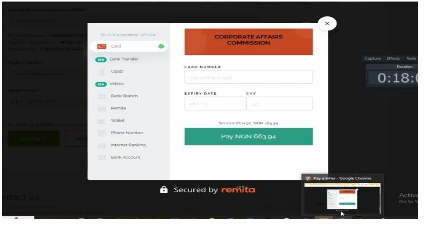
An OTP is going to be sent to me.
I will fill it in here and then confirm my payment so you should check your email or your phone number or anywhere you receive your OTP from and make sure you do the same.
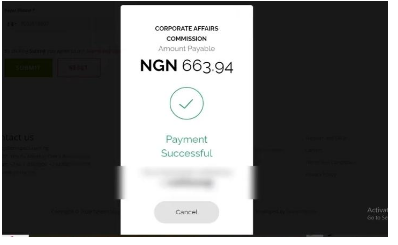
Great.
So my payment is successful right now.
As you can see, I can download my receipt here, or I can view it back.

So after I make my remita payment, I will have to wait for a few days to receive approval for this name reservation and then check up later to see if this process has been accepted.
That is how it goes.
So I’m going to check it up after some days to see if this process has been done successfully.
Back to the dashboard, it will move to the pending status which is already indicated.
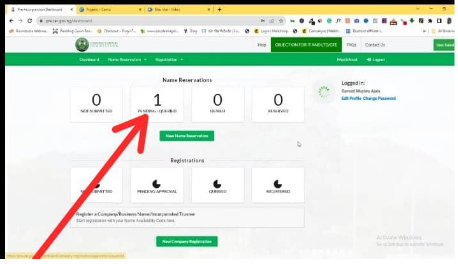
CAC Business Name Registration
Once you have completed your CAC Business name reservation successfully and it’s approved, you will see something like this on your dashboard
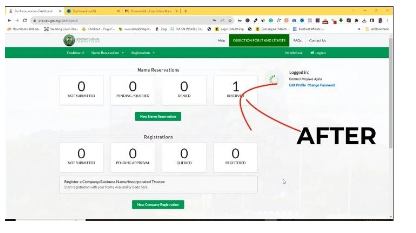
So as you can see, my reservation status has moved from pending to Reserved. We can continue our business name registration process from here.
I’ll click on the reserved name as shown above and click Start Registration.
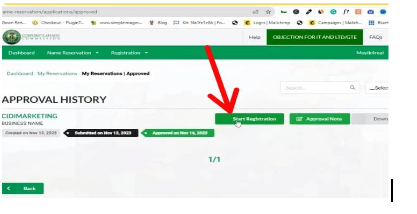
As you can see here, there are about six steps that we are quickly going to be completing and they are not difficult at all. So let’s begin with step one which is entering our business details.
Now, I wouldn’t want to jump any step in this section because there are some important details that I have to explain to you.
So make sure you keep following the steps and don’t skip any part of this guide. Then if you have any questions for me, I believe you should then ask in the comment section and I promise to read every one of them and answer your queries.
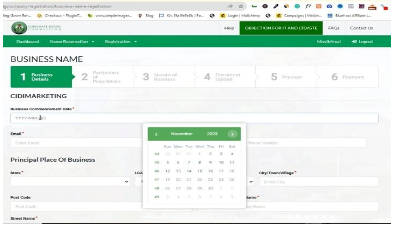
So here at the business commencement date, I want you to impute the date that you started this registration, not the date that you started doing business.
The reason is this:
If you use an old date then CAC will charge you for those days as if you have defaulted.
So use the very day that you are doing this registration.
Now remember that if you’re making this registration for your client, every detail has to be that of your client and not yours.
Input Your email.
Input your phone number
At the Principal Place of business, it means the very location of your business.
Add the state that your business is located in your local government area of business, your business city, town or village, postcode, house number, building name, whichever.
If your business has any branch then fill all of these in. If not, you can skip it. It’s not compulsory.

Click save and continue
Here at step two, you can see that my name and my details are automatically added here as the individual proprietor that is the owner of this business.
This is the reason why if you’re working for a client, you must use the client’s details 100% from the beginning of this registration process.
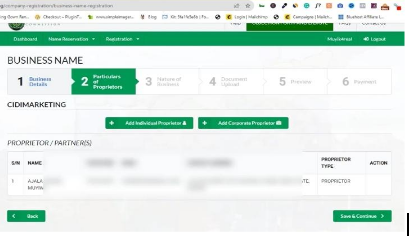
I’ll click save and continue.
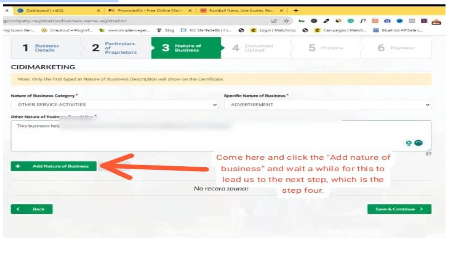
I will again “Add nature of business” We already did that while doing our business reservation, but I will go ahead and repeat the same details here.
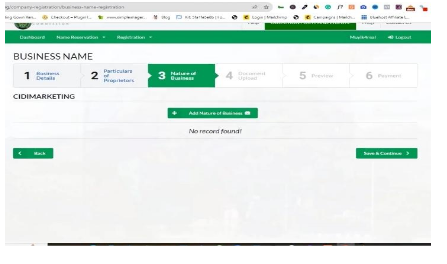
Here at nature of business category, just select the best one that suits your business the most.
Do the same for the specific nature of business. You can add more details, but only the first one will show up on your CAC certificate.
So take note of that.
Click the “Add nature of business” and wait a while for this to lead us to the next step, which is the step four.
Okay, so here we are to upload relevant documents which are means of identification, signature, passport, and any other documents.
Now for the ID card, make sure that it’s in PDF format while the rest have to be in image format of either PNG or JPEG.
So make sure that you convert all your documents and then we are ready for upload.
How To Convert Documents
How to do this is easy.
Just use your phone to snap your ID card.
Look for a plain sheet of paper, and sign your signature. Again, snap it with your phone. Make sure it’s clear.
Then finally, if you don’t already have a passport, just use your phone and snap your face on a plain background. That’s all.
And if you have a passport you can use it directly.
Now if you use your phone, all of this will be saved in JPEG, but you have to convert your ID card to PDF.
You can simply upload your ID card to any tools like Canva or even Google Docs and then download it in PDF form or use any converter on the Google Play store to do it.
So I will just go ahead and upload each of my documents right away. When you finish uploading, Click “Save and continue”

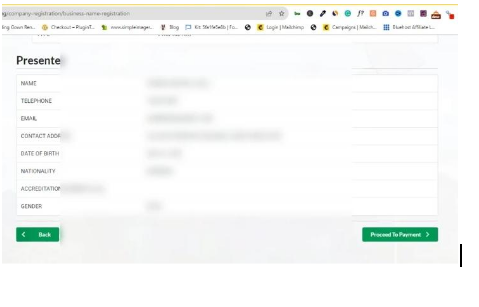
Next is just for me to preview and make sure that all my details are correct and are well represented.
This is because once you make payments, you cannot make any changes again. So take note of that.
You can always go back to make changes and corrections before you make payments.
And once I am cool with this then I will click “Proceed to payment”
CAC Business Name Payment
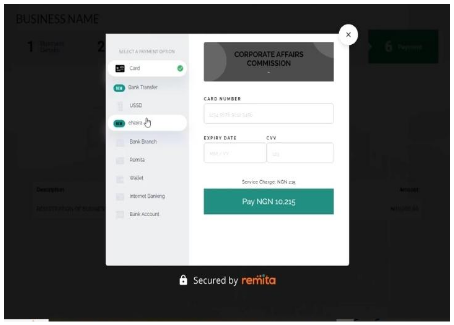
So registration of your business name is ₦10,000.00, excluding the little extra charges that you’re going to be making. So once you’re ready to pay then click the “Remita” button.

here you’ll be paying ₦10,215.00 in total. So go ahead and make your payments. You can use any of these options here, just like we did when we were paying for our name reservation.
After your payment is successful, log in again to your dashboard and keep checking it until you see that your registration status is now showing pending approval.

In that case, you just want to wait for between two to five days maximum for CAC to validate your business name registration and print or download your CAC certificate or other documents that you want to use and that is it.
You have successfully registered your business name.
Summary: Complete CAC Business Name Registration
So over to you. I hope you have been able to use this easy guide to carry out your CAC Business name registration.
If you have any questions for me, then drop them in the comment section and I promise to check them and promptly give you a response.
Cheers!
0 Comments